
Web Form Monitoring

Make sure the messages and requests your customers send actually get to you.

What we check

We fill out your forms like a real customer would and confirm the message arrives.

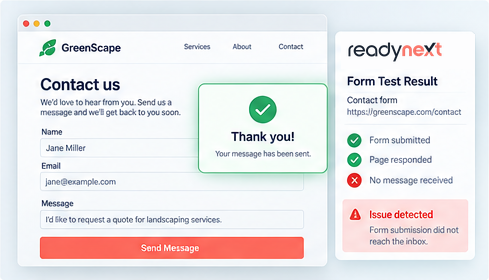
Your contact, quote and appointment forms are where interested visitors become leads. ReadyNext submits a clearly labeled test inquiry through each form you choose, then checks that it lands where it should: your inbox, your CRM or your team's notifications. If the form errors out, the submit button stops working, or the message never shows up, you hear about it right away.

Illustrative Web Form Monitoring check interface
Illustrative example · Not live results.
  1. Test submission

    We submit a clearly labeled test through the forms you choose.

  2. Message delivery

    We confirm the inquiry reaches its intended destination.

  3. Issue notifications

    You hear when a form errors or a message does not arrive.

Why it matters

A Missed Message Could Mean a Missed Customer.

A broken form doesn't look broken. The page loads, the visitor types their details, clicks submit, and walks away thinking they reached you. You never see the message, and they assume you ignored them. Forms break for ordinary reasons: a plugin update, an expired email setting, a spam filter, a changed password. Most owners only find out when a customer calls to ask why nobody replied, or never calls at all.

An example customer experience

Customer action

Your customer sees “Thank you.”

What goes unnoticed

You never receive the inquiry.

What a notification looks like

Know What's Wrong. Know What to Do Next.

When ReadyNext detects a problem, you receive a clear notification explaining what happened and what needs attention.

ReadyNextExample notification

Needs attention

Your "Request a quote" form stopped delivering messages.

Our test inquiry at 9:02 AM was submitted but never reached your inbox. Customers using this form since then may not have reached you. Forward this notification to your web person, or open it in ReadyNext for the technical details.

View details

Web Form Monitoring

Our test inquiry at 9:02 AM was submitted but never reached your inbox. Customers using this form since then may not have reached you. Forward this notification to your web person, or open it in ReadyNext for the technical details.

Example notification