
Security Shield (SSL)

Keep the padlock on your website, and the "Not secure" warning off it.

What we check

We check that your website's security certificate is valid, set up correctly and not about to expire.

Your SSL certificate is what puts the padlock next to your web address and keeps visitors' information private. ReadyNext checks it on a schedule and confirms it's valid, matches your domain and covers every version of your address. We warn you well before it expires and notify you immediately if it stops working, so there's time to fix it before customers ever notice.

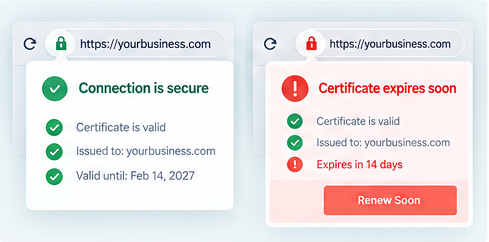
Illustrative Security Shield (SSL) check interface
Illustrative example · Not live results.
  1. Check validity

    We confirm your security certificate is valid.

  2. Match your address

    We check it matches your domain and covers your address versions.

  3. Warn before expiry

    You receive advance warnings and notifications if it stops working.

Why it matters

A Security Warning Stops Customers at the Door.

When a certificate expires or breaks, browsers show visitors a full-page security warning instead of your website. Most people won't click past it, and the ones who do won't trust you with their name, phone number or payment details. Certificates are supposed to renew automatically, but renewals fail more often than owners expect, usually after a hosting change or an expired payment card.

An example customer experience

Customer action

A visitor opens your website.

What goes unnoticed

A security warning replaces your page.

What a notification looks like

Know What's Wrong. Know What to Do Next.

When ReadyNext detects a problem, you receive a clear notification explaining what happened and what needs attention.

ReadyNextExample notification

Needs attention

Your security certificate expires in 14 days.

After that, visitors to yourbusiness.com will see a "Not secure" warning instead of your website. Forward this notification to your hosting company or web person so they can renew it in time.

View details

Security Shield (SSL)

After that, visitors to yourbusiness.com will see a "Not secure" warning instead of your website. Forward this notification to your hosting company or web person so they can renew it in time.

Example notification