
Broken Link Detection

Find the dead ends on your website before your customers do.

What we check

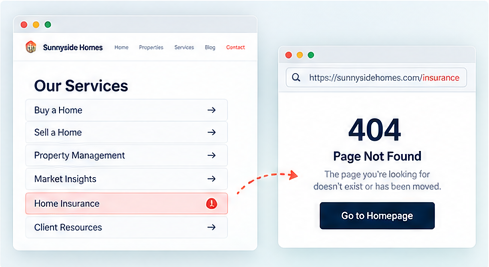
We follow the links across your website and flag any that lead to an error or a missing page.

ReadyNext scans your website and tests the links on each page: menus, buttons, phone and email links, and links to other sites. When a link leads to a "page not found" error or nowhere at all, we list it with the exact page it's on and where it was supposed to go, so whoever maintains your site can fix it in minutes.

Illustrative Broken Link Detection check interface
Illustrative example · Not live results.
  1. Follow your links

    We test menus, buttons and links across your website.

  2. Find dead ends

    We flag links that lead to errors or missing pages.

  3. Pinpoint the location

    You see the originating page and intended destination.

Why it matters

Don't Lose a Customer at the Last Click.

Links break all the time. A page gets renamed, a listing expires, a partner changes their website, or a booking tool moves. Visitors who click and hit an error page lose trust fast, especially if it's the "Schedule now" or "Get a quote" button. Search engines notice too, and a site full of dead ends can slip in search results.

An example customer experience

Customer action

A visitor clicks “Schedule now.”

What goes unnoticed

They reach “Page not found.”

What a notification looks like

Know What's Wrong. Know What to Do Next.

When ReadyNext detects a problem, you receive a clear notification explaining what happened and what needs attention.

ReadyNextExample notification

Needs attention

We found 3 broken links on your website.

The "Schedule a visit" button on your Contact page leads to a page that no longer exists. Open ReadyNext to see all three, with the exact page and link for each, ready to share with your web person.

View details

Broken Link Detection

The "Schedule a visit" button on your Contact page leads to a page that no longer exists. Open ReadyNext to see all three, with the exact page and link for each, ready to share with your web person.

Example notification