
Website Speed

Fast pages keep customers. Slow pages send them to your competitors.

What we check

We measure how long your key pages take to load and flag pages that are getting slower.

ReadyNext loads your most important pages on a schedule, on both mobile and desktop, and tracks how long it takes before a visitor can actually see and use them. We compare each result to your site's normal speed, so you hear about real slowdowns, not one-off blips. When a page slows down, we point to the likely cause in plain terms, like oversized images or a slow server.

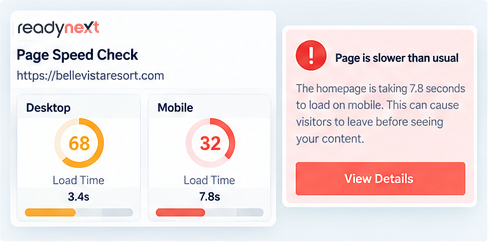
Illustrative Website Speed check interface
Illustrative example · Not live results.
  1. Measure load times

    We load your key pages on mobile and desktop.

  2. Compare normal speed

    We compare results with your site's usual performance.

  3. Explain slowdowns

    We notify you to real slowdowns and their likely cause.

Why it matters

Don't Make Your Next Customer Wait.

Most of your visitors are on a phone, often on a cellular connection, and they won't wait. If a page takes too long, they hit back and tap the next result, which is usually a competitor. Sites tend to slow down gradually as images, plugins and add-ons pile up, so it's easy to miss until leads start drying up. Search engines also favor faster sites.

An example customer experience

Customer action

A customer opens your website.

What goes unnoticed

They leave while it is still loading.

What a notification looks like

Know What's Wrong. Know What to Do Next.

When ReadyNext detects a problem, you receive a clear notification explaining what happened and what needs attention.

ReadyNextExample notification

Needs attention

Your homepage got noticeably slower.

On phones, it now takes about twice as long to load as it did last week. The likely cause is large images added recently. Open ReadyNext for the details to share with your web person.

View details

Website Speed

On phones, it now takes about twice as long to load as it did last week. The likely cause is large images added recently. Open ReadyNext for the details to share with your web person.

Example notification